Replay Events
In cases where event delivery to consumers fails, feature to replay events could be necessary. Few of the scenarios from AIP perspective->
- Consumer webhook is unavailable and event cannot be delivered within the configured period (max of 24 hours - automatic retry is built in)
- Consumer receives the event but is unable to process it due to configuration issues
- Consumer receives the event but is unable to process it due to data errors - this event should be replayed from the source after correcting data
Since events are published and consumed at service level, it is reasonable to expect that multiple related or unrelated events are published and consumed after a specific failure. This possibility precludes replaying an event at some random point of time without analyzing its effect on subsequent events that have already been processed. Tools described below can assist the flow, but whether any event can be replayed has to be determined by Customer Support/TechHub resource (after consultation with customer if necessary).
Tools in Event Viewer to assist replaying event(s):
- A new function will be added to easily identify failures due to configuration or process (cases 2 & 3)
- Event acknowledgment with not success status will be used to isolate events
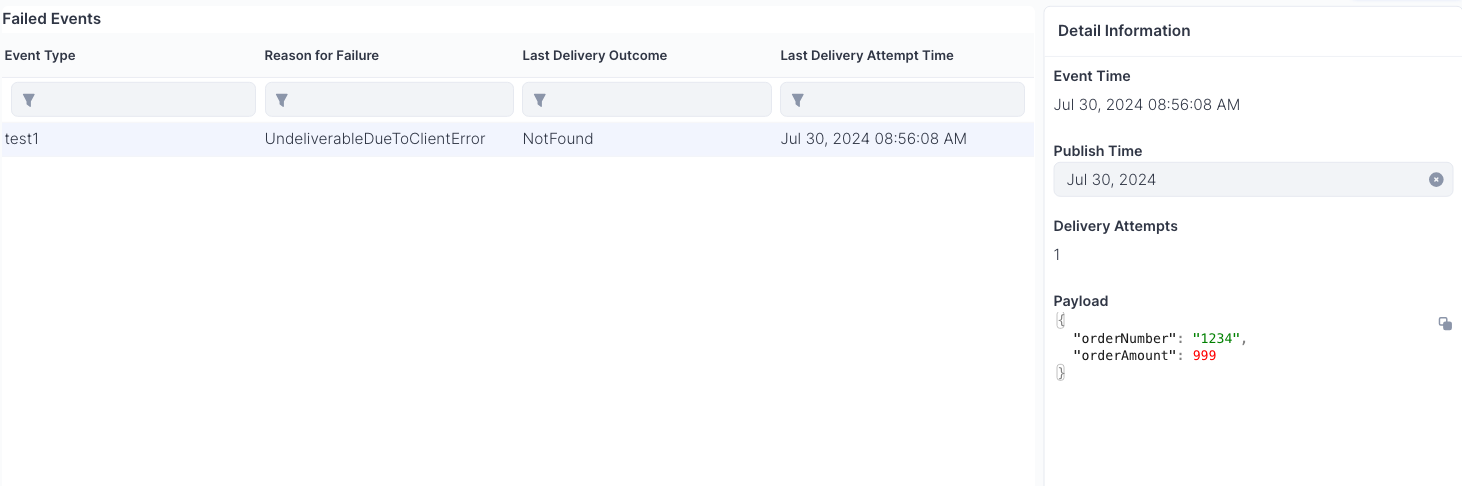
- Function to identify failed delivery is already available (case 1 - image below)
- Batched email notification (to support/techHub) when failure is identified will be added
Pre-reqs: It is assumed that logging is enabled at product level to identify failures communicating with AIP
- Service unavailable
- Bad request (400)
- Authentication failures (401)
- Invalid event (404)
Notes: This process is defined to be executed by customer support or tech hub resources. Not intended for end-user in its current form.
Image of delivery failed events:
Republishing Events
When an event received by the consumer webhook cannot be processed correctly due to incorrect configuration or other issues, the target product may fail to handle it properly. In such cases, the event republish option can be used to trigger AIP to publish that consumer-specific event. This allows the target product to receive the event once again and process it successfully. The endpoint accepts an array of event IDs, enabling the republishing of one or more events in a single request.
Below is an example of the curl syntax to republish an event:
curl --location 'https://https://appcentral-aip-dev.apteansharedservices.com/v2/events/republish' \
--header 'x-aptean-correlation-id: <your-correlation-id>' \
--header 'Content-Type: application/json' \
--header 'Authorization: Bearer <your-bearer-token>' \
--data '
[
    "<event-id-guid>"
]'
Note: Since this republish action is targeted specifically at a particular consumer, the event will not be pushed to other consumers of the original event.