Bulk Sync Support
Use cases for data sync between products
-
Initial bulk-sync - one product which has been in use by the customer is required to be integrated to another product. Data from source product needs to be synced to target product for specific entities like customer, items, sales history, etc.
-
Resync - need to resync data between two products which could have gotten out of sync after periods of use.
This document addresses use case 1 support in AIP. In this document AppCentral is designated as the initiator of the bulk sync process but the role can be assumed by other actors - source/target, too.
Overall Flow
Sync initiated for product --> [ source calls /init for each entity -> uploads file(s)->calls /uploadCompete after each file -> transformation process in AIP -> raises download-ready -> consumer downlods file (optional step) ] --> source calls /exportcomplete once all entities are uploaded -> AIP raises bulksync-import-ready -> consumer processes/imports all downloaded files
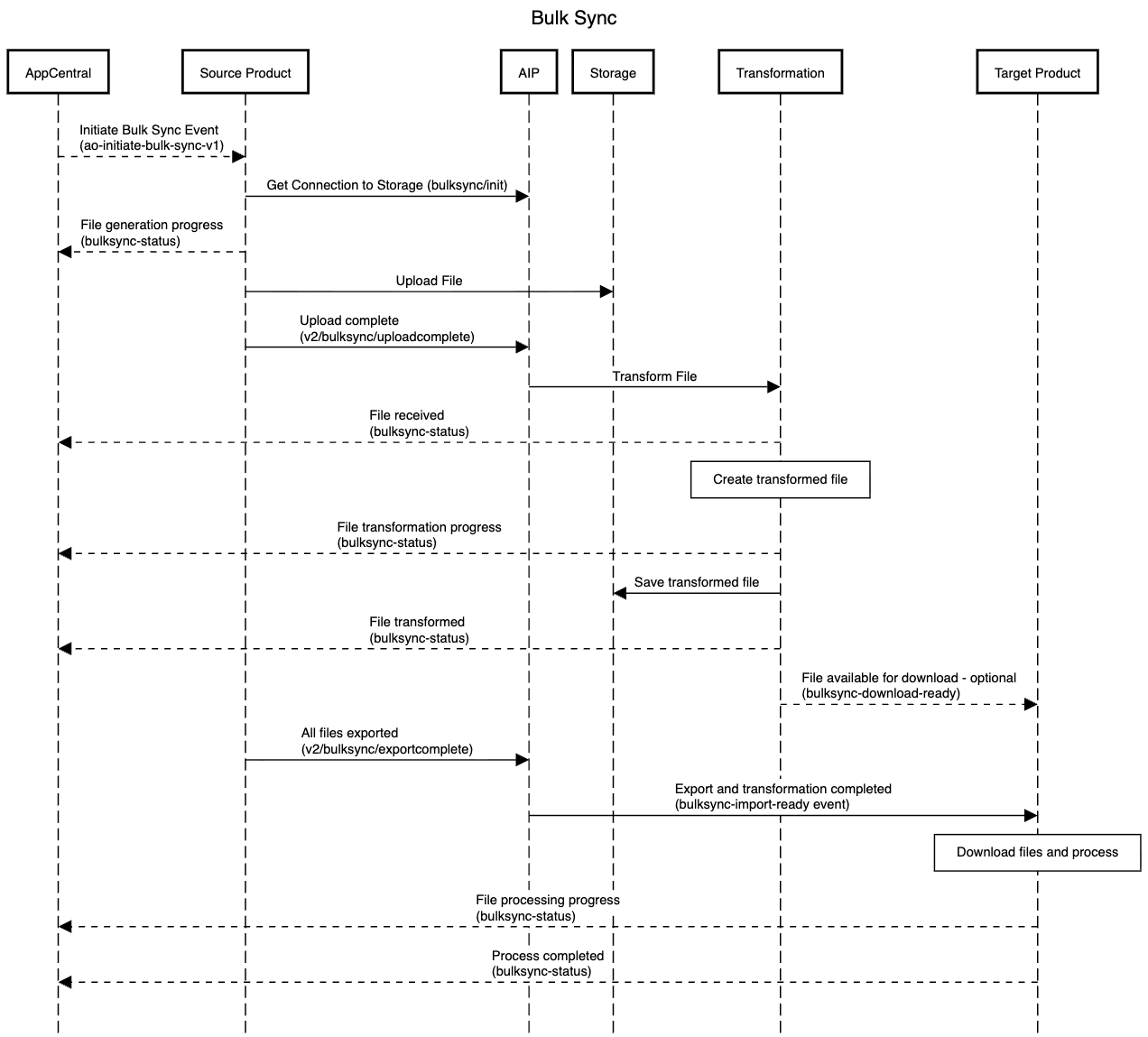
File structure
- Name: use the same name as the event definition type, e.g. customer-created-v1.json
- File content should use the JSON schema
{
    "$schema": "http://json-schema.org/draft-07/schema#",
    "type": "object",
    "properties": {
        "items": {
            "type": "array",
            "items": {
                "type": "object",
                "properties": {
                    "payload": {
                        "type": "object"
                    }
                },
                "required": ["payload"]
            }
        }
    },
    "required": ["items"]
}
- File sample
JSON payload
{
    "items": [
        {
            "payload": {
                "orderId": "74",
                "amount": 220,
                "orderDate": "2024-09-17T05:38:58.095Z"
            }
        },
        {
            "payload": {
                "orderId": "49",
                "amount": 67,
                "orderDate": "2024-09-17T07:02:19.672Z"
            }
        }
    ]
}

XML payload
{
    "items": [
        {
            "payload": {
                "xmlContent": "<xml><sample><name>ABC Company</name><orderNumber>1234567</orderNumber><active>no</active></sample></xml>"
            }
        },
        {
            "payload": {
                "xmlContent": "<xml><sample><name>ABC Company</name><orderNumber>1234567</orderNumber><active>no</active></sample></xml>"
            }
        }
    ]
}
How to initiate bulk sync - export from source product
- Pre-req: Install packages for the Azure Blob Storage based on your tech stack, .net, java, etc.
- Call /v2/bulksync/init
- Request header: {X-APTEAN-CORRELATION-ID:{{correlationId}}, Authorization: bearer {{jwt}}}
- jwt: token from IAM
- Correlation ID must be the value from the event initiated by AppCentral
- Request body/response
Body:
{
    "sourceTenantId": "{{tenant ID}}",
    "sourceProductId": "{{source product ID}}",
    "targetProductId": "{{target product ID}}",
    "eventDefinitionType": "{{event definition type of source entity}}",
    "configuration": "{{configuration values}},
    "totalRecords": {{total number of records}}
}

Response:
{
    "sourceTenantId": "{{tenant ID}}",
    "sourceProductId": "{{source product ID}}",
    "targetProductId": "{{target product ID}}",
    "eventDefinitionType": "{{event definition type of source entity}}",
    "targetSchema": "{{schema of target entity}},
    "configuration": "{{configuration values}}",
    "configurationMapped": "{{mapped configuration values}}",
    "blobUrl": "unique blob container URL",
    "sessionId": "unique session ID"
}
- Upload file(s)
- Based on the response from the previous call, upload files for specific entity directly to Azure Blob Storage (install package)
Sample code:
    BlobContainerClient containerClient = new BlobContainerClient(new Uri(response.blobUrl));
    //ensure file name matches the eventDefinitionType
    string localFilePath = $"{path}/{eventDefinitionType}.json"; //add sequence number if divided into multiple files
    string blobName = response.sessionId + "/" + Path.GetFileName(localFilePath);
    BlobClient blobClient = containerClient.GetBlobClient(blobName);

    using FileStream uploadFileStream = File.OpenRead(localFilePath);
    await blobClient.UploadAsync(uploadFileStream, true);
    uploadFileStream.Close();
- Call v2/bulksync/uploadcomplete
- Inform AIP that file upload is completed. AIP will start the process of transformation
- Request header: {X-APTEAN-CORRELATION-ID:{{correlationId}}, Authorization: bearer {{jwt}}}
- jwt: token from IAM
- Correlation ID must be the value from the event initiated by AppCentral
- Request body/response
- Repeat for each file when enity is divided into multiple files
Body:
{
    "sessionId": "{{sessionID from the response to bulksync/init}}",
    "fileName": "name of the uploaded file",
    "itemCount": "number of payload items"
}

Response:
{ }
Repeat the steps for all entities that have to be exported.
How to complete bulk sync - export from source product
- Once source product has completed uploading all files for all entities call v2/bulksync/exportcomplete
- Request header: {X-APTEAN-CORRELATION-ID:{{correlationId}}, Authorization: bearer {{jwt}}}
- jwt: token from IAM
- Correlation ID must be the value from the event initiated by AppCentral
- Request body/response
Body:
{
    "sourceTenantId": "{{tenant ID}}",
    "sourceProductId": "{{source product ID}}",
    "targetProductId": "{{target product ID}}"
}
- Once transformation of all files have been completed bulksync-import-ready event is raised
- Target product should listen to this event
- bulksync-import-ready event contains an array of files ordered by when they were uploaded from source
- target product should download and import the files sequentially
- note that target product could also download files as they become available and process them once import-ready event fires
How to initiate download - target product
Note: Processing the files after _bulksync-import-ready- event is recommended. This event is invoked only after all the files for all entities have been exported and transformed from the source product.
- Add listener to event bulksync-import-ready
- Event payload contains "files" array with sorted order of files. Each node contains: { "sessionId", "blobUrl", "blobName", "errorBlobName", "sourceProductId", "eventDefinitionType", "targetSchema", "configuration", "itemCount", "mappedItemCount" }
- Download file using the parameters blobUrl and blobName
- if errorBlobName is not empty then dowload the file to inspect entities that failed transformation
- These items would have to be inspected manually to determine corrective action
- Use configuration property from payload to determine the mapped configuration if necessary
- Send bulksync-status event to indicate progress
- Use correlation ID from the bulksync-import-ready event
Sample code:
    BlobContainerClient containerClient = new BlobContainerClient(new Uri(payload.blobUrl));
    BlobClient blobClient = containerClient.GetBlobClient(payload.blobName);
    string localPath = Path.combine(Path.GetTempPath(), Path.GetDirectoryName(blobName));
    if (!System.IO.Directory.Exists(localPath))
    {
        System.IO.Directory.CreateDirectory(localPath);
    }
    await blobClient.DownloadToAsync(Path.Combine(localPath, Path.GetFileName(blobName));
    //optionally can download to file stream
How to send status updates to AppCentral
- Source product should send status updates as each file is generated/exported
- Transformation service will send updates as each file is transformed
- Target product should send status updates as each file is processed/imported
- Use event definition "bulksync-status"
- use Product ID: 7AF17029-C37D-4945-AC5F-88D72651FC9B
- AppCentral needs to listen to only this single event for all products
Sample event:
"payload": {
    "eventDefinitionType": "bulksync-status",
    "sourceTenantId": "{{sourceTenantId}}",
    "sourceProductId": "7AF17029-C37D-4945-AC5F-88D72651FC9B",
    "payload": {
        "sessionId": "{{sessionId}}",
        "sourceProductId": "{{Source product ID}}",
        "targetProductId": "{{Target product ID}}",
        "eventDefinitionType": "customer-created-v1",
        "fileName": "customer-created-v1.json",
        "action": "file-generation-progress",
        "progress": 70,
        "message": "700/1000 records processed successfully"
    }
}
    "payloadSchema": {
      "type": "object",
      "properties": {
        "sessionId": {
          "type": "string",
          "description": "unique session id"
        },
        "sourceProductId": {
          "type": "string",
          "description": "source product id"
        },
        "targetProductId": {
          "type": "string",
          "description": "target product id"
        },
        "eventDefinitionType": {
          "type": "string",
          "description": "event definition type"
        },
        "fileName": {
          "type": "string",
          "description": "file name being processed"
        },
        "action": {
          "enum": [
            "file-received",
            "file-transformed",
            "file-downloaded",
            "file-generation-progress",
            "transformation-progress",
            "consumer-progress",
            "consumer-completed",
            "error-report"
          ]
        },
        "progress": {
          "type": "integer",
          "description": "Progress counter - multiples of 10%, min of 100"
        },
        "message": {
          "type": "string",
          "description": "message corresponding to the action"
        }
      }