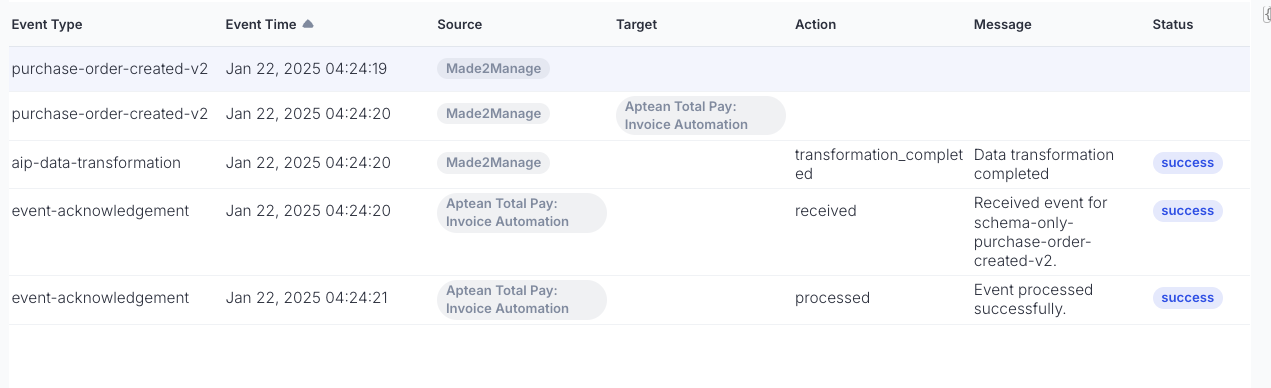
Purpose of event log
This is what allows the event viewer to display the sequence of events that occurred from event publishing to consumption and processing. After the event is received in the webhook, following logs should be published:
- Acknowledgement that the event was received.
- After processing the payload, acknowledgement that processing either succeeded or failed.
Posting to event log
This POST request should be sent to /v2/events/eventlog. The request header must contain the key x-aptean-correlation-id. The value is read from the received event's correlationId property. The request body must include eventDefinitionType, sourceTenantId, sourceProductId, and payload with action, message, and status. Note that eventDefinitionType is always "event-acknowledgement".
Payload schema for event-acknowledgement:
{
    "properties": {
       "action": {
         "type": "string"
      },
     "message": {
       "type": "string"
      },
     "status": {
       "type": "string" //success, failed
      }
}
Here are samples of the event received by the webhook and call to publish event log:
Consumed Event:
  {
    "id": "8723ea9a-c17f-492c-8a29-6cb2e0833e04",
    "subject": "465740d9-8137-42de-9f88-32e9566334e6::a7b8890d-c4e8-4b21-84bf-9e6158528acc",
    "data": {
      "id": "8723ea9a-c17f-492c-8a29-6cb2e0833e04",
      "eventType": "erp-order-created-v1",
      "productName": "sample",
      "sourceProductId": "7af17029-c37d-4945-ac5f-88d72651fc9b",
      "apiVersion": "2.0",
      "payload": {
        "orderId": "565",
        "amount": 798,
        "orderDate": "2024-03-14"
      },
      "signature": "---",
      "correlationId": "order-565",
      "producerId": "a7b8890d-c4e8-4b21-84bf-9e6158528acc",
      "consumerId": "465740d9-8137-42de-9f88-32e9566334e6",
      "configuration": null,
      "targetProductId": "7af17029-c37d-4945-ac5f-88d72651fc9b",
      "targetSchema": "erp-order"
    },
    "eventType": "erp-order-created-v1",
    "dataVersion": "2.0",
    "metadataVersion": "1",
    "eventTime": "2024-03-14T13:34:59.3012006Z",
  }
Event Log:
curl --location 'https://appcentral-aip-dev.apteansharedservices.com/v2/events/eventlog'     --header 'Authorization: bearer' --header 'X-APTEAN-CORRELATION-ID: order-565' --header 'Content-Type: application/json' --data '{
    "eventDefinitionType": "event-acknowledgement",
    "sourceTenantId": "01df0391-baee-403d-a269-7cfca03df808",
    "sourceProductId": "7af17029-c37d-4945-ac5f-88d72651fc9b",
    "payload": {
        "action": "received",
        "message": "order 565 received",
        "status": "success"
    }
}'
Here's an example of how the event flow is visualized in the event viewer which helps troubleshooting when necessary: