Event Visualizer
All events that are published through AIP are logged in repository for a period of 14 days and will be available to be viewed from Aptean One Portal - Event Viewer.
The primary purpose of the Event Viewer is to assist in troubleshooting if the event flow is interrupted. For example, customer reports that ERP order is not showing up in Aptean Ship; in such case a member from Tech Hub can use the Event Viewer to check if the order was indeed sent to Ship and/or if there were any validation errors or communication issues in the flow. Thus providing more visibility to the integrations.
In the initial phase, Event Viewer will be available in ApteanOne for internal support only with the goal of allowing customers themselves access to dashboard with this information as the ApteanOne portal matures.
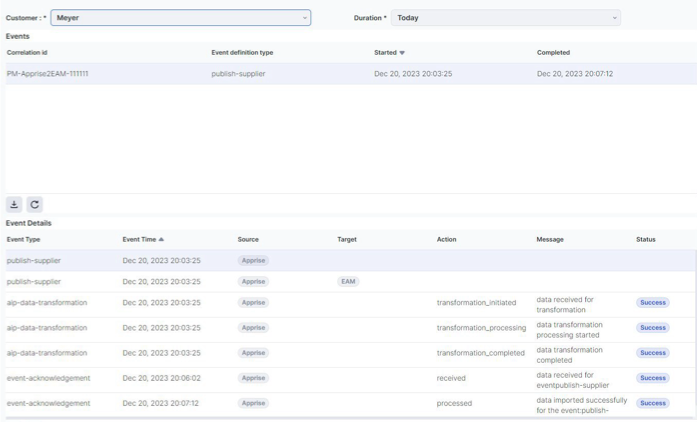
- Event Viewer displays all the events associated with the integrations for the selected customer
- This screen visualizes summarized events in a table format and when any event is selected, all the correlated events are listed in the detail table below. This will help us in viewing the sequence of events that occurred upon original publishing and the subsequent logged events during processing by the consumer.
Sample view